

If you made the switch to solar, you are probably keeping a close eye on your system’s performance. But when your post-solar electric bill arrives, you might notice a confusing solar app vs electric bill discrepancy. Why does your solar app say you produced one amount of energy, while your utility company claims a completely different number?
This is the most common question we receive from solar owners. The good news is that your system is likely working perfectly. When comparing your solar app vs electric bill, the confusion simply comes down to where the energy is measured, how your home consumes it, and when the utility company reads your meter.
Where It’s Measured: The Inverter vs. The Utility Meter
To understand the difference between these two numbers, you have to look at the physical locations where your power is actually being measured.
Solar App
- Reads at the Inverter
The raw power generated by your panels is measured immediately by your solar system’s inverter (or microinverters). Because the inverter sits right at the source, it counts every single kilowatt-hour (kWh) your system creates. This is the “Total Production” number you see in your app, and it is the most accurate measure of your system’s overall health.
Electric Bill
- Reads at the Utility Meter
After your power leaves the inverter, it flows into your home’s main electrical panel. Your house gets “first dibs” on this energy, immediately consuming it to run your lights, HVAC, and appliances. Only the leftover energy that your home doesn’t use gets pushed to the meter. Your utility meter, which provides the numbers for your electric bill, only measures this excess power.
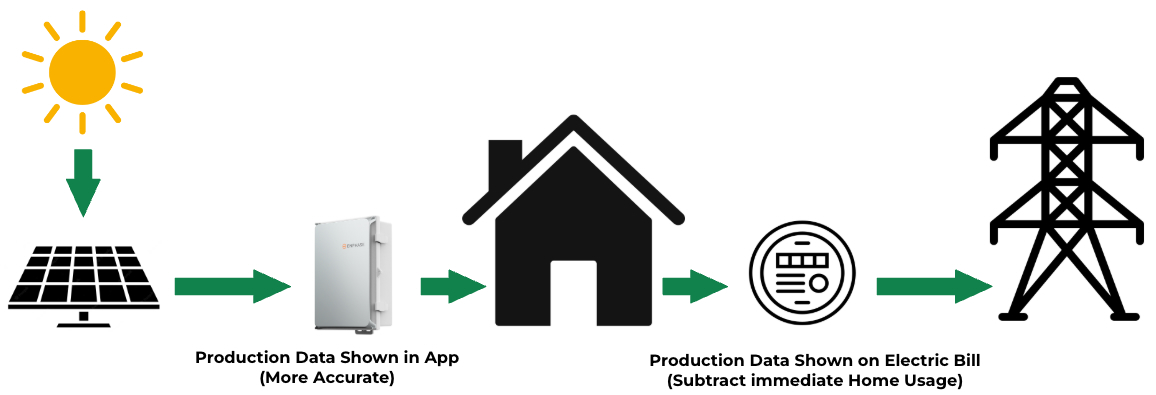
This physical separation is the primary reason for the solar app vs electric bill difference. Because your home “eats” a portion of the solar energy before the utility company ever gets a chance to see it, the energy sent to the grid will always be lower than your total production.
2. When It’s Measured: Mismatched Billing Cycles
There is another major reason your numbers won’t align: timeframes.
When you open your solar app and look at your monthly production, the app defaults to standard calendar months (e.g., exactly May 1st to May 31st). However, utility companies rarely read your meter on the first and last day of the month. Your electric bill might cover a billing cycle from the 14th of one month to the 14th of the next.
If you are trying to compare your solar app vs electric bill to see if things line up, looking at a calendar month in your app won’t work. You have to use the custom date filters in your solar monitoring app to perfectly match the specific billing cycle dates listed on your utility statement.
How to Read Your Electric Bill After Solar
Once you understand that your electric company only tracks the energy you pull from the grid and the excess energy you push back to it, reading your bill is easy.
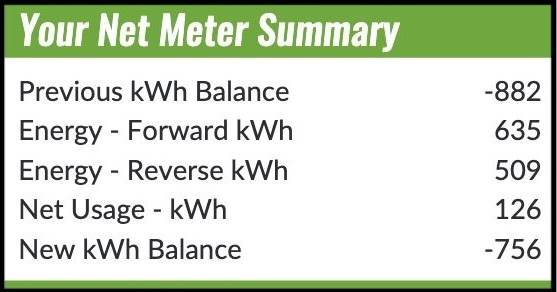
While utility companies might use slightly different wording, here is a breakdown of the net metering section on a standard bill (using common SMECO terminology as an example):
- Previous kWh Balance
- This is your running “bank account” of rolled-over solar energy credits. It represents the amount of excess energy your system pushed back to the grid in prior months that your home hasn’t used up yet. This number will usually be negative, but this is a good thing- it means you have a surplus! If you don’t have any banked credits yet, this section will read 0 or simply not be listed.
- Energy – Forward kWh
- This is the electricity you pulled from the grid. You still pull power from the utility company at night, on rainy days, or simply when your panels aren’t generating enough to power your entire home.
- Energy – Reverse kWh
- This is the excess solar energy you pushed back to the grid. This happens on when your panels are producing more power than your house needs at that exact moment.
- Net Usage – kWh
- This is simply your Forward kWh minus your Reverse kWh. If you pushed more power than you pulled, this number will be negative, meaning you are banking credits!
- In the example above, this homeowner pulled 635 kWh from the electric grid and pushed 509 kWh to the grid this month, resulting in a Net Usage of 126 kWh.
- 635 kWh – 509 kWh = 126 kWh
- In the example above, this homeowner pulled 635 kWh from the electric grid and pushed 509 kWh to the grid this month, resulting in a Net Usage of 126 kWh.
- This is simply your Forward kWh minus your Reverse kWh. If you pushed more power than you pulled, this number will be negative, meaning you are banking credits!
- New kWh Balance
- This takes your Previous kWh Balance and factors in your current Net Usage. This resulting number is what carries forward to your next month. If your New Balance is negative, you have successfully pushed more power to the grid than you have used over the year.
- In the example above, we see -882 kWh (Previous kWh Balance) adding 126 kWh (Net Usage), resulting in -756 kWh for the New kWh Balance. The next month, the Previous kWh Balance will be -756 kWh and the process starts again!
- This takes your Previous kWh Balance and factors in your current Net Usage. This resulting number is what carries forward to your next month. If your New Balance is negative, you have successfully pushed more power to the grid than you have used over the year.
What About the Monthly Bill Amount?
If you have a negative kWh balance (meaning your solar system is producing plenty of excess power), you won’t be charged for your energy usage. Instead, your monthly bill will only consist of standard utility connection fees and service charges (typically ranging from $4.50 to $10.00, depending on your utility). These flat fees keep you connected to the grid so you have power at night.
Managing Your Extra Credits
If you consistently produce more energy than you use, your negative kWh balance will continue to grow.
Every April, utility companies conduct a “true-up.” They look at your final kWh balance for the year. If you have an excess, that balance is converted into a dollar amount based on the weighted average of the Energy Charge over the previous 12 months. This credit is then applied directly to your account to help cover your monthly connection fees.
Note: As of October 2023, many Maryland utility customers outside of SMECO territory can elect to indefinitely carry over their accrued kWh credits year-over-year instead of receiving an annual payout, allowing you to bank energy for future use. Use the links below to opt-in to indefinite accural of net excess generation.
Bottom Line
Understanding the solar app vs electric bill difference shouldn’t be a headache. Always trust your solar monitoring app (the inverter) for the true measure of what your system produced, and use your utility bill (the meter) to track your grid usage and banked credits.
If you ever have questions about your specific system’s performance, the team at Energy Select is always here to help you get the most out of your solar investment!
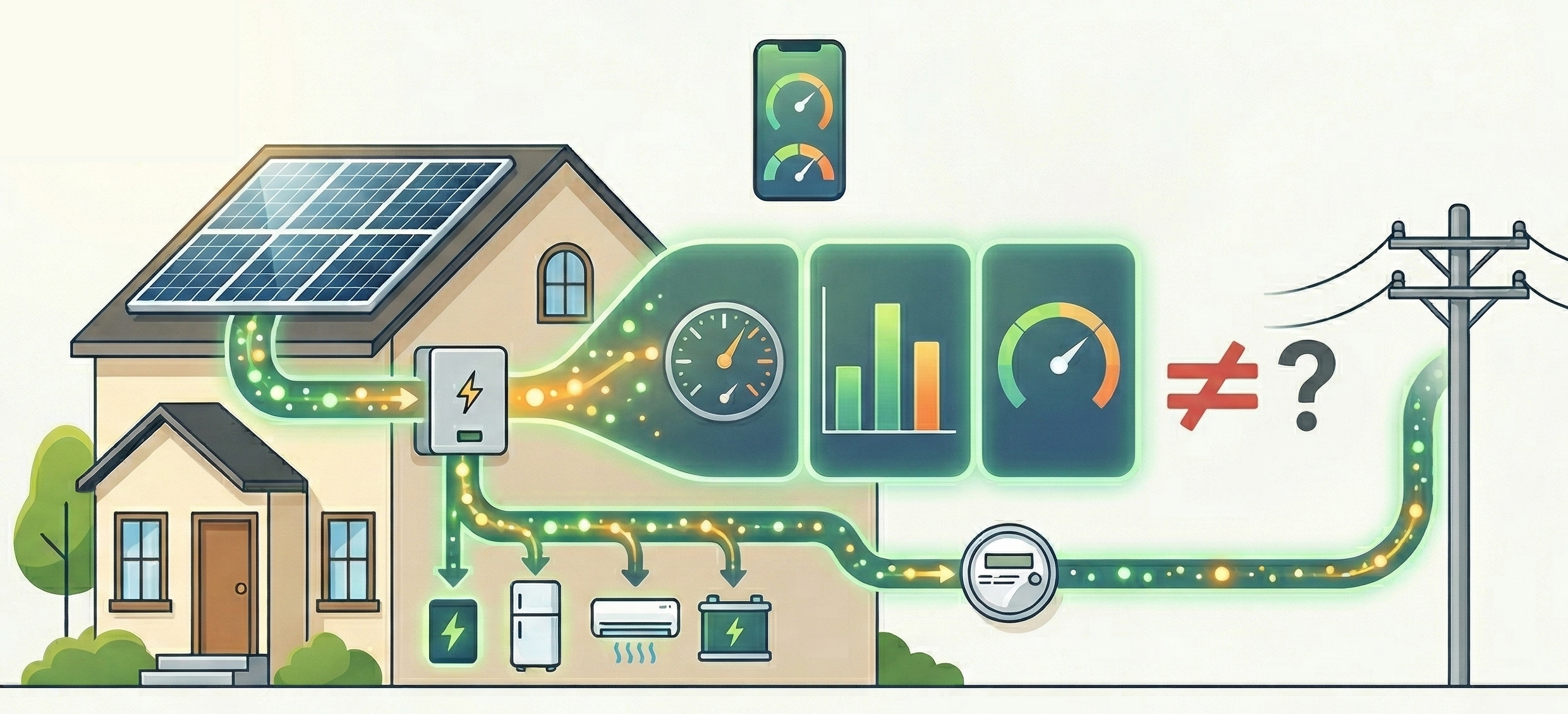
Seeing a solar app vs electric bill discrepancy? Learn why your inverter and utility meter don’t match, and how to read your bill.

Asking ‘Does solar make sense in Maryland?’ is a relatively simple question, but after being in the energy industry since 2002, we know […]

Learn how solar panels perform in winter and what Maryland residents should expect, including efficiency, snow impact, and energy savings.